- 1. Development Was Delayed
- 2. Requirements Change at the Last Minute
- 3. Business Wants an Immediate Release
- Example
- Tested
- Partially Tested
- Not Tested
- Option A — Extend Testing
- Option B — Reduce Scope
- Option C — Release With Known Risk
- Option D — Phased Release
- Priority 1 — Critical
- Priority 2 — High
- Priority 3 — Medium
- Priority 4 — Low
Imagine this.
The developer tells you:
“The build is ready.”
You check the release plan.
Production deployment: Tomorrow morning.
Now you look at your testing scope.
You have 15 critical features to test, regression testing pending, API testing still to be done, multiple browsers to check, a few known defects, and test data that isn’t ready yet.
And then you get one more message:
“QA, please complete testing by EOD.”
What would you do?
Work faster?
Skip some testing?
Tell the team, “This is impossible”?
There is actually a better way to handle it.
Unrealistic testing deadlines are a reality in many software projects. Development can run late, requirements can change, or the business may need an urgent release. The important thing is how you respond when there simply isn’t enough time to test everything.
Instead of trying to test everything blindly, step back and ask:
What absolutely needs to be tested before the release?
Then identify the risks, prioritize the important scenarios, communicate what can realistically be covered, and make the remaining risks visible to the stakeholders.
In this article, we’ll look at how to handle unrealistic testing deadlines without compromising your professional judgment or silently accepting unnecessary release risks.
What Is an Unrealistic Testing Deadline?
Simply put, a testing deadline becomes unrealistic when the testing scope is much larger than the time available.
For example, suppose the team gives you 2 days, but based on the scope and complexity, you estimate that proper testing would take around 5 days.
That doesn’t automatically mean the release has to be delayed.
Instead, the first question should be:
“What can we realistically test in these 2 days, and what risks will remain?”
That’s where prioritization becomes important.
Why Do Unrealistic Testing Deadlines Happen?
Unrealistic deadlines can happen for several reasons.
1. Development Was Delayed
There isn’t always one reason.
Sometimes development takes longer than expected. Sometimes a new feature is added at the last minute. And sometimes there is a genuine business reason for releasing quickly.
1. Development Was Delayed
Suppose the original plan was:
Development → 5 days
Testing → 3 days
Release → Day 9
But development takes 8 days instead.
Now QA may have only one day left for testing.
The testing scope hasn’t necessarily become smaller.
The available testing time has.
2. Requirements Change at the Last Minute
You may have experienced this:
“Can we include this feature in tomorrow’s release as well?”
It sounds simple.
But a new feature can mean:
- Functional testing
- Negative testing
- API testing
- Integration testing
- Regression testing
- Security validation
And the deadline usually doesn’t move with the additional scope.
3. Business Wants an Immediate Release
Sometimes the deadline really is important.
It could be because of:
- A production issue
- A security fix
- A customer commitment
- A regulatory requirement
- An important business need
In such situations, trying to test everything perfectly may not be realistic.
The better goal is:
Reduce the most important risks within the time you have.
How to Handle Unrealistic Testing Deadlines
The first thing I’d suggest is: don’t panic.
And don’t immediately respond with:
“This cannot be done.”
Instead, take a few minutes to understand the situation and follow a structured approach.
The 7-Step Approach
- Understand the deadline
- Identify the testing scope
- Estimate the required effort
- Prioritize based on risk
- Communicate what’s achievable
- Document untested areas and risks
- Make a risk-based release recommendation
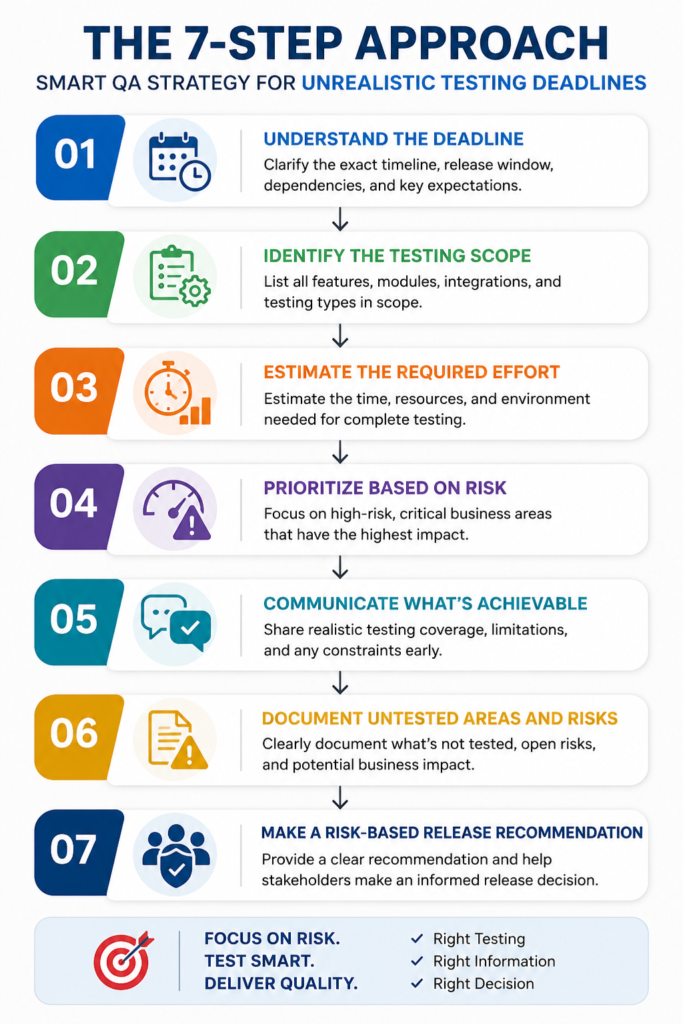
Let’s understand each step.
1. Understand the Actual Deadline
Before you start executing test cases, clarify what “complete testing by EOD” actually means.
Ask:
- What time is the production deployment?
- When will the build be available?
- Is the deployment window fixed?
- Which features are business-critical?
- Is full regression mandatory?
- Can lower-priority features be moved to a later release?
- Is a phased release possible?
These questions can turn a vague deadline into a much clearer testing plan.
2. Identify the Testing Scope
Don’t look at 100 test cases and think:
“I have to execute all 100 before EOD.”
First divide them according to priority and business impact.
For example:
| Area | Priority | Estimated Effort |
|---|---|---|
| Login | Critical | 1 hour |
| Payment | Critical | 3 hours |
| Checkout | Critical | 2 hours |
| User Profile | Medium | 1 hour |
| Reports | Medium | 2 hours |
| UI changes | Low | 1 hour |
| Full regression | High | 6 hours |
If you have only 5 hours, but the estimated effort is 16 hours, the problem is obvious.
Instead of saying:
“We don’t have enough time.”
You can say:
“The current scope needs approximately 16 hours, but we have 5 hours available. I recommend covering payment, checkout, login, and other critical workflows first. Full regression and lower-priority scenarios will remain incomplete.”
That gives the team something they can actually act on.
3. Use Risk-Based Testing
Risk-based testing is particularly valuable when dealing with unrealistic testing deadlines because it helps QA teams focus their limited time on the functionality that presents the greatest business risk.QA professionals can refer to ISTQB Official Website
You cannot test everything equally.
Ask two questions:
Question 1:
How likely is this feature to fail?
Question 2:
What happens if it fails?
High probability + high impact = highest priority
Example
Imagine you’re testing an e-commerce application.
| Feature | Probability of Failure | Business Impact | Priority |
|---|---|---|---|
| Login | Medium | High | High |
| Payment | High | Critical | Critical |
| Checkout | High | Critical | Critical |
| Product image alignment | Medium | Low | Low |
| Profile color | Low | Low | Very Low |
| Order cancellation | Medium | High | High |
If you have only a few hours, start with:
Payment → Checkout → Order → Login → Critical APIs
Don’t spend the first hour checking button colors.
4. Prioritize Critical Business Flows
When testing time is limited, focus on workflows that can directly affect:
- Revenue
- Customers
- Security
- Data integrity
- Compliance
- Core functionality
- Business operations
For example, in a banking application:
Login
Account balance
Money transfer
Transaction history
Payment
should generally receive higher attention than cosmetic UI issues.
In an HRMS:
Employee data
Attendance
Leave
Payroll
Role-based access
may be high-risk areas.
The exact priorities should always depend on the application’s business context.
5. Don’t Skip Testing Silently
This is one of the most important rules.
If you don’t have enough time, don’t silently skip test scenarios.
Document what was:
Tested
- Login
- Checkout
- Payment
- Critical APIs
Partially Tested
- Reports
- Notifications
Not Tested
- Full regression
- Safari compatibility
- Low-priority UI scenarios
This creates transparency.
It also protects the team from assuming that:
“QA completed everything.”
when that wasn’t actually possible.
6. Communicate Risk, Not Just Time
Weak QA communication sounds like:
“I need more time.”
Better communication sounds like:
“The current scope requires approximately 12 hours, but only 5 hours are available. I can complete critical business-flow testing within the available window, but full regression and cross-browser testing will remain incomplete.”
Even better:
“If we release after critical-flow testing only, the remaining risks are regression defects and browser-specific issues. I recommend either extending the testing window or reducing the release scope.”
This changes the conversation from:
QA needs more time
to:
The release has known risks.
That’s a much more professional approach.
7. Discuss Trade-Offs With Stakeholders
QA shouldn’t make business decisions alone.
If testing time is insufficient, present options.
For example:
Option A — Extend Testing
Add one more day for QA.
Benefit: More coverage
Risk: Release delayed
Option B — Reduce Scope
Release only critical features.
Benefit: Better testing coverage for important functionality
Risk: Some features move to a later release
Option C — Release With Known Risk
Test critical flows and release.
Benefit: Meets business deadline
Risk: Untested areas may contain defects
Option D — Phased Release
Release to a smaller group first.
Benefit: Reduced exposure
Risk: Additional release management required
Now stakeholders can make an informed decision.
A QA Engineer Should Not Say “YES” or “NO” Too Quickly
Suppose someone asks:
“Can we release tomorrow?”
Don’t immediately answer:
“Yes.”
And don’t immediately answer:
“No.”
Instead, explain:
- What was tested
- What passed
- What failed
- What remains untested
- Severity of open defects
- Business impact
- Affected users
- Known risks
- Possible mitigation
Then provide your recommendation.
For example:
“Critical user journeys have passed, and no Sev-1 or Sev-2 defects are currently open. However, full regression and Safari testing are incomplete. Based on the current risk profile, I recommend release only if the business accepts these residual risks.”
That’s risk-based QA thinking.
How to Prioritize Test Cases Under Time Pressure
A simple prioritization model can help.
Priority 1 — Critical
Test first.
Examples:
- Login
- Payment
- Checkout
- Data creation
- Data deletion
- Security
- Core APIs
- Critical business workflows
Priority 2 — High
Test next.
Examples:
- Search
- Filters
- Notifications
- Reports
- Important integrations
Priority 3 — Medium
Test if time permits.
Examples:
- Secondary workflows
- Less-used functionality
- Non-critical validations
Priority 4 — Low
Test last.
Examples:
- Cosmetic UI issues
- Minor alignment
- Low-impact usability issues
Use the “Must Test vs Nice to Test” Approach
When the deadline is extremely tight, divide your test scope into two categories.
Must Test
These scenarios could cause serious business impact if they fail.
Nice to Test
These scenarios are useful but less risky.
For example:
Must Test
- Login
- Payment
- Order creation
- Order cancellation
- Security
- Critical API
Nice to Test
- Minor UI alignment
- Tooltip text
- Low-priority filters
- Less frequently used reports
This makes prioritization easier.
What If the Manager Says: “Just Test Everything Quickly”?
This happens.
Don’t respond:
“That’s impossible.”
Instead, respond professionally.
You can say:
“I can prioritize the critical workflows and complete those within the available timeline. However, testing the complete scope would require additional time. If we proceed with the current deadline, I’ll document the areas that could not be fully validated and the associated release risks.”
This is assertive without being confrontational.
What If Your Manager Keeps Pushing?
Sometimes the deadline remains unrealistic even after you communicate the risks.
In that situation:
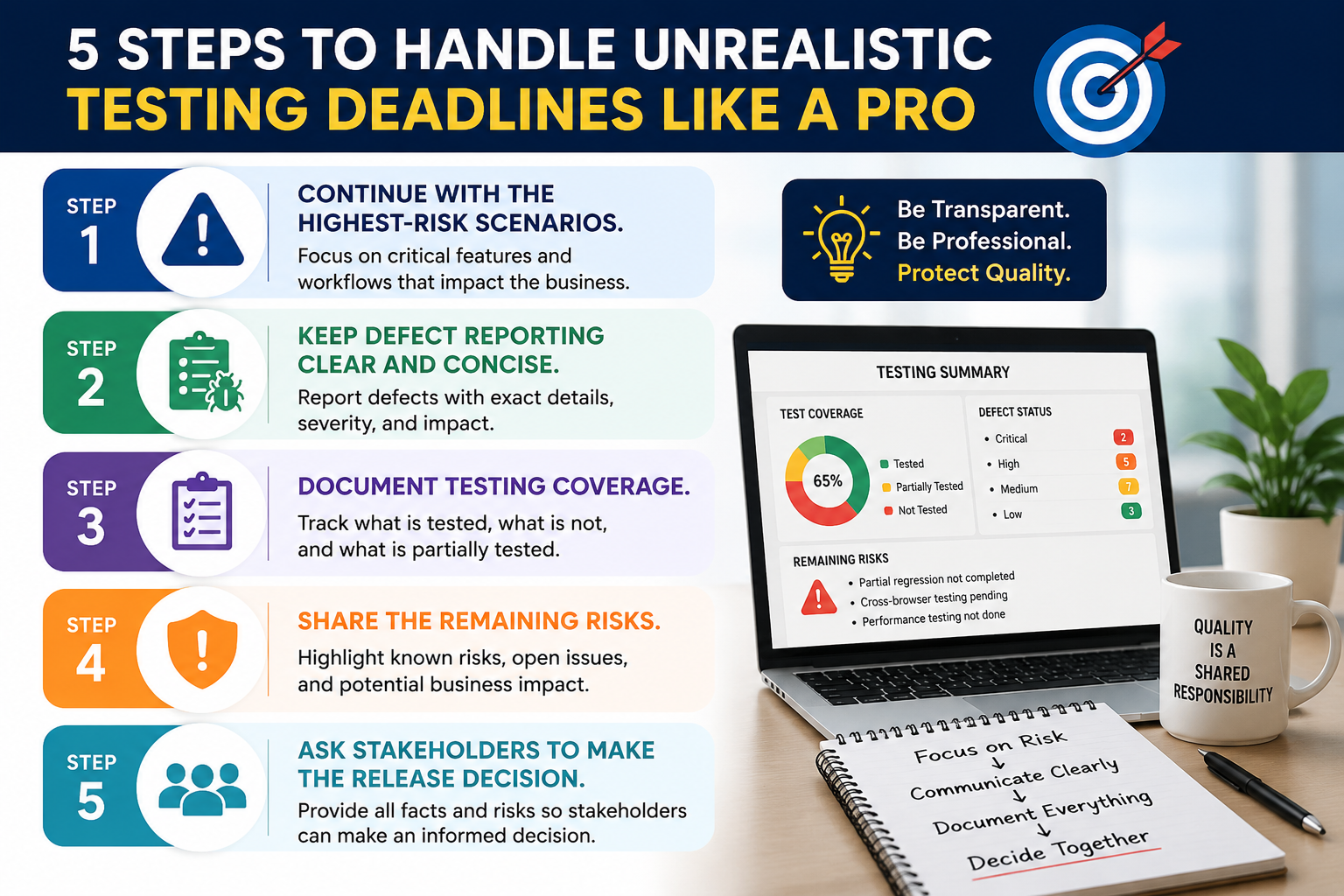
Remember:
QA provides quality information and risk visibility. The final business release decision may belong to the appropriate product/business stakeholders.
Your job is not to artificially declare the product “safe” just because the deadline is approaching.
How to Handle an Unrealistic Deadline Without Burning Out
Testing under pressure can quickly become exhausting.
Avoid trying to compensate for unrealistic planning by continuously working excessive hours.
Instead:
Prioritize
Focus on high-risk areas.
Communicate
Raise risks early.
Collaborate
Work with developers and product owners.
Automate Repetitive Checks
If you have an existing automation suite, use it for suitable regression checks.
Reuse Test Data
Don’t waste time creating the same data repeatedly.
Parallelize
Where practical:
Tester A → Payment
Tester B → User Management
Tester C → API
Tester D → Regression
Track Coverage
Use a simple checklist so nothing critical is accidentally forgotten.
Automation Can Help — But It Is Not a Magic Solution
When deadlines are tight, people sometimes say:
“Just automate it.”
Automation can help, but automation is not an instant solution.
If a feature has never been automated, writing stable automation scripts may take longer than executing a small number of manual tests.
Use automation where:
- Tests are repetitive
- Tests are stable
- Regression coverage already exists
- Execution frequency is high
- Automation provides a meaningful time benefit
For example:
A stable login regression suite can be executed automatically.
But a brand-new feature that changed two hours ago may still require exploratory manual testing.
The right question is:
“What testing approach gives us the highest risk coverage within the available time?”
Exploratory Testing Under Tight Deadlines
Exploratory testing can be extremely useful when time is limited.
Instead of executing every detailed test case line by line, use your product knowledge to explore high-risk areas.
For example:
Test a payment workflow by intentionally trying:
- Invalid card
- Expired card
- Multiple clicks
- Refresh during payment
- Back button
- Network interruption
- Duplicate payment
- Session timeout
This can uncover serious defects quickly.
Example: One-Day Testing Deadline
Suppose you receive a new build at:
10:00 AM
Release is:
Tomorrow at 10:00 AM
You have approximately one working day.
The scope includes:
- 20 features
- 100+ test cases
- Regression
- API testing
- Cross-browser testing
You obviously cannot provide equal coverage everywhere.
10:00–11:00
Smoke testing
- Application launch
- Login
- Navigation
- Critical APIs
11:00–2:00
Critical business workflows
- Core transaction
- Payment
- Data creation
- Data update
- Data retrieval
2:00–4:00
High-risk regression
Focus on areas impacted by the new changes.
4:00–5:00
Negative testing
Test major failure scenarios.
5:00–6:00
Defect retesting
Validate fixed critical defects.
6:00–7:00
Final risk assessment
Document:
- Tested areas
- Untested areas
- Open defects
- Known risks
- Release recommendation
The exact schedule will vary by project, but the principle remains:
Prioritize risk instead of attempting unrealistic 100% coverage.
Great share at one place. Documented nicely. Very helpfull.Thanks a lot.Keep sharing …….
Thank you so much, Nitin! Glad you found it helpful. This is just the beginning , we are working on bringing more practical, easy-to-use resources for IT professionals. Keep visiting, there is more valuable content coming your way!